Every time Apple releases a major operating system update, the developer and tech community divides into two camps: the early adopters who hit update immediately, and the cautious pragmatists who wait for the first patch. As someone who manages local automation scripts, handles API endpoints, and runs daily technical tests, I usually err on the side of caution.
However, with macOS 27 Golden Gate marking the official transition into an Apple Silicon-exclusive era, I decided to pull the trigger on my daily driver.
After putting it through a full, heavy workday—switching between terminal sessions, tweaking automations, and testing local workflows—my primary takeaway is clear: this update goes way beyond cosmetics. It delivers deep productivity and system optimizations that power users and developers will immediately appreciate.
Key Features Transforming My Daily Productivity
1. Context-Aware Siri AI & Screen Reading
The biggest upgrade in Golden Gate is how deeply Siri AI integrates into active workflows. Instead of just handling basic voice commands, Siri now features real-time Screen Reading and Visual Intelligence.

Here is how that plays out in daily practice:
- Debugging Code Errors: When stuck on an obscure terminal error or a broken compiler output, you no longer need to copy-paste logs into a browser. Simply open Spotlight or trigger Siri and ask, “What is causing this syntax error on my screen?” Siri analyzes the active window context and suggests targeted fixes instantly.

- Finding Obscure UI Menus: If you are navigating complex IDE settings, video editors, or design tools and can’t find a nested option, ask Siri directly (“Where do I configure custom webhook triggers in this app?”). It highlights or directs you straight to the setting on your screen.

2. Native Window Tiling & Liquid Glass Polish
While previous macOS versions introduced basic snapping, Golden Gate refines UI consistency across multi-monitor setups. All application windows now share uniform corner radii and edge-to-edge sidebars, making side-by-side workspace layouts look clean and intentional.
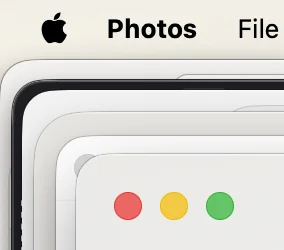
For example, when writing code while monitoring API responses, you can snap your IDE to the left half, terminal to the top right, and browser inspector to the bottom right—complete with customizable keyboard shortcuts. No extra background utilities required, saving both RAM and CPU cycles.
3. Enhanced Continuity & iPhone Mirroring Window Resizing
Continuity features receive major usability updates in Golden Gate, most notably the ability to freely resize the iPhone Mirroring window on desktop displays.

In real-world use:
- Mobile App Testing: Developers can scale mobile app previews directly on their Mac screen alongside desktop code editors, observing responsive layouts in real time.
- Streamlined Notifications: You can review 2FA login prompts, drag photos straight into web forms, or respond to mobile alerts without needing to touch your physical phone or break focus.
Hardware Synergy & Performance Notes
Because Golden Gate is engineered strictly for Apple Silicon, system responsiveness feels exceptionally snappy. Memory management is tightly optimized, and background processes run quietly.
If you are currently evaluating your overall workstation setup, software efficiency is only half the story. Having lightweight, capable hardware makes a massive difference; for instance, examining the performance and battery tradeoffs in a MacBook Air M2 vs ASUS Zenbook 14 OLED comparison highlights how well Apple’s custom architecture handles modern OS workloads.

Furthermore, if your daily workflow involves building micro-tools or backend automations on Mac, Golden Gate’s environment pairs seamlessly with lightweight developer resources, such as leveraging the best free AI APIs for developers to automate repetitive tasks right from your terminal.
Final Verdict: Should You Upgrade?
If you are running an M-series Mac, upgrading to macOS 27 Golden Gate is a smooth, high-value transition. The combination of screen-aware Siri AI, refined window management, and native Apple Silicon optimization makes it one of the most stable day-one releases in recent memory.
For official device support lists and full technical release notes, check out Apple’s official macOS Golden Gate overview.
P.S. If you are working on an SEO project and experiencing indexing issues on your tech blog, check out this post on fixing crawled – currently not indexed in Google Search Console to get your latest articles indexed faster.