Apple’s new iOS 26 Photo Cleanup tool in the Photos app finally brings an AI-powered way to remove unwanted objects or people from your pictures — something Android users have enjoyed for years. But if you’re using an older model like the iPhone 12, you might be wondering why you can’t find the feature even after updating to iOS 26.
As a programmer who loves testing every new Apple feature, I was excited to try it myself. But when it didn’t appear on my iPhone 12, I started digging deeper — and here’s what I found.
📷 What Is the Clean Up Tool?
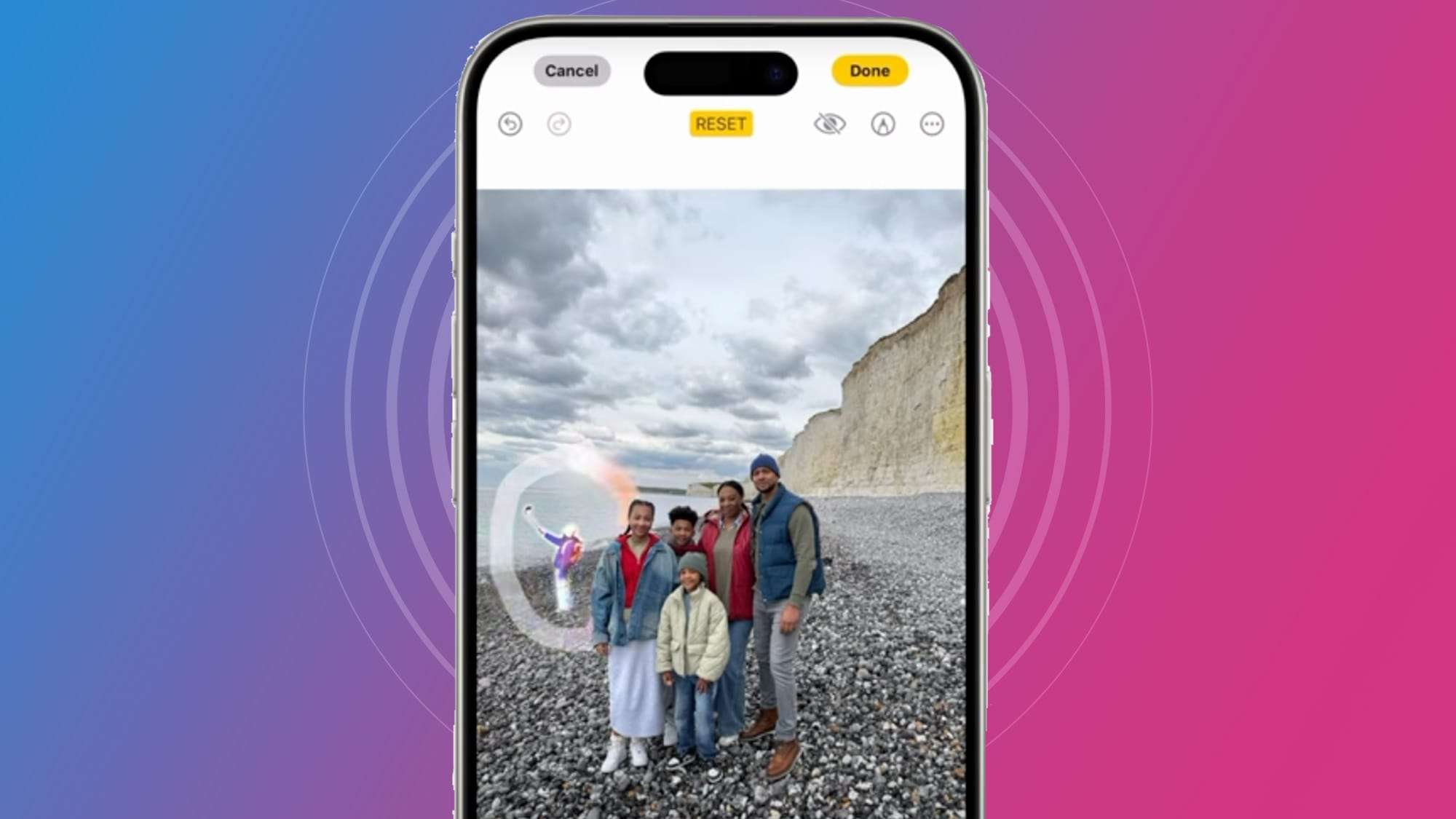
The iOS 26 Photo Cleanup tool is part of Apple Intelligence, Apple’s new AI system that runs directly on your device. It lets you remove distractions in your photos by simply brushing over them. The AI then analyzes the image, fills in the gap intelligently, and makes it look like the object was never there.
It’s Apple’s version of the Magic Eraser you see on Android phones — except Apple emphasizes that all processing happens on-device, not in the cloud, to protect user privacy. You can read more about it directly from Apple’s official page on Apple Intelligence.
If AI can streamline photo edits in iOS 26, it’s no surprise creators are using AI to speed up scripts and thumbnails — read How YouTubers Use AI for Scripts and Thumbnails (2025 Guide) to learn how.
🪄 How to Use It (If You Have It)
- Open the Photos app and choose a photo.
- Tap Edit → then find the Clean Up icon (it looks like a small eraser).
- Brush over the object or person you want to remove.
- Wait a moment — the AI will automatically clean up the image.
- Tap Done to save it.

The first time you use Clean Up, your iPhone may download a small AI module in the background, which helps improve accuracy. According to a walkthrough on Tom’s Guide, this happens silently and only once.
📱 Why It Doesn’t Show on Older iPhones (Like iPhone 12)
This is where many users get confused — even though you’ve installed iOS 26, the Clean Up tool might not appear. The reason is hardware limitation.
Apple Intelligence, which powers Clean Up, needs advanced hardware like the A17 Pro chip or newer to run its on-device AI models. The iPhone 15 Pro and Pro Max fully support it, but earlier devices (iPhone 12, 13, 14 non-Pro) simply don’t have the Neural Engine performance needed for local AI tasks.
In short:
The feature isn’t missing because of a bug — it’s missing because your iPhone can’t process the AI model fast enough without lag or overheating.
Apple confirmed this through their official support documentation, and sites like 9to5Mac have also reported that no additional models gained Apple Intelligence support with iOS 26.
⚖️ Android vs Apple: Who Did It Better?
Android phones — especially Google Pixel and Samsung Galaxy — have offered similar tools for a while. Google’s Magic Eraser and Samsung’s Object Eraser can remove unwanted people or backgrounds easily.

However, most Android phones process these edits via the cloud or a hybrid model. Apple’s approach is entirely on-device, meaning your photos never leave your phone for processing. That’s a slower rollout, but a more private one.
For context, Apple has always taken a cautious approach when introducing AI features — unlike Google, which often tests AI tools widely, Apple focuses on privacy, precision, and deep system integration first.
You can see Apple’s broader AI direction explained in this Apple Newsroom article about iOS 26.
Although iOS 26 brings powerful AI photo tools, it’s worth remembering that the best value iPhone in 2025 is still the affordable iPhone 15 model, especially for users who prioritize everyday usability over cutting-edge features.
🔍 Is Apple Really Late in the AI Game?
Yes — but also, not really.
Apple’s timeline looks slower because they waited until they could perform these edits without cloud dependency. They’re late compared to Android, but that delay came with a tradeoff: better privacy and tighter integration.
For example, when Android’s Magic Eraser first launched, it sometimes left obvious blur marks or messy backgrounds. Apple’s Clean Up tool, in my experience, produces smoother and more natural results — though it’s limited to newer devices.
Still, users are understandably frustrated. Even with iOS 26, many feel left behind, especially since devices like the iPhone 12 still perform well for everything else.
🚀 What Apple Might Do Next
Looking at the pattern, Apple could expand Apple Intelligence and the Clean Up feature to more devices with iOS 27 or later, depending on performance optimizations. There’s also a chance Apple could offload AI tasks to the cloud securely, much like it already does with Siri’s new processing model.
The company is also rumored to enhance visual AI features — things like Visual Understanding (reading text from screenshots) and smarter content awareness across apps — according to MacRumors.
If Apple executes this well, they might finally catch up with Android in convenience while keeping their privacy-first reputation intact.
✅ Final Thoughts
If you don’t see the Clean Up tool yet, don’t worry — it’s not an error. It’s simply not supported on older hardware. Apple is slowly rolling out Apple Intelligence features, and future updates may bring broader compatibility.
So yes, Apple might have been late to the AI photo editing game, but their version of it feels more refined and secure — and that might be what helps them win long-term.
Want to explore more about iPhones and Apple’s innovation? Check out our iPhone category here, or read our recent post about the iPhone 17 Air — the thinnest iPhone ever made.